
Affiliate disclosure: This article contains affiliate links. As an Amazon Associate, Markham Bookkeeping may earn from qualifying purchases at no extra cost to you. The products listed below were selected for educational purposes to help business owners think about better record keeping, tax organization, receipts, paperwork, and home office setup.
Tax season becomes much easier when your business records are already organized before your accountant or bookkeeper asks for them. For many small business owners, the problem is not always complicated accounting. Sometimes the real issue is simple: receipts are scattered, invoices are mixed with personal papers, bank statements are hard to find, and important documents are stored in different places.
A clean home office system can make a big difference. You do not need a complicated setup to stay organized. A few practical office tools can help you separate receipts, sort tax documents, keep monthly records together, scan paperwork, and avoid the last-minute panic that often happens when bookkeeping is ignored all year.
Here are seven useful home office tools that can help small business owners build better bookkeeping habits and stay more prepared for tax season.
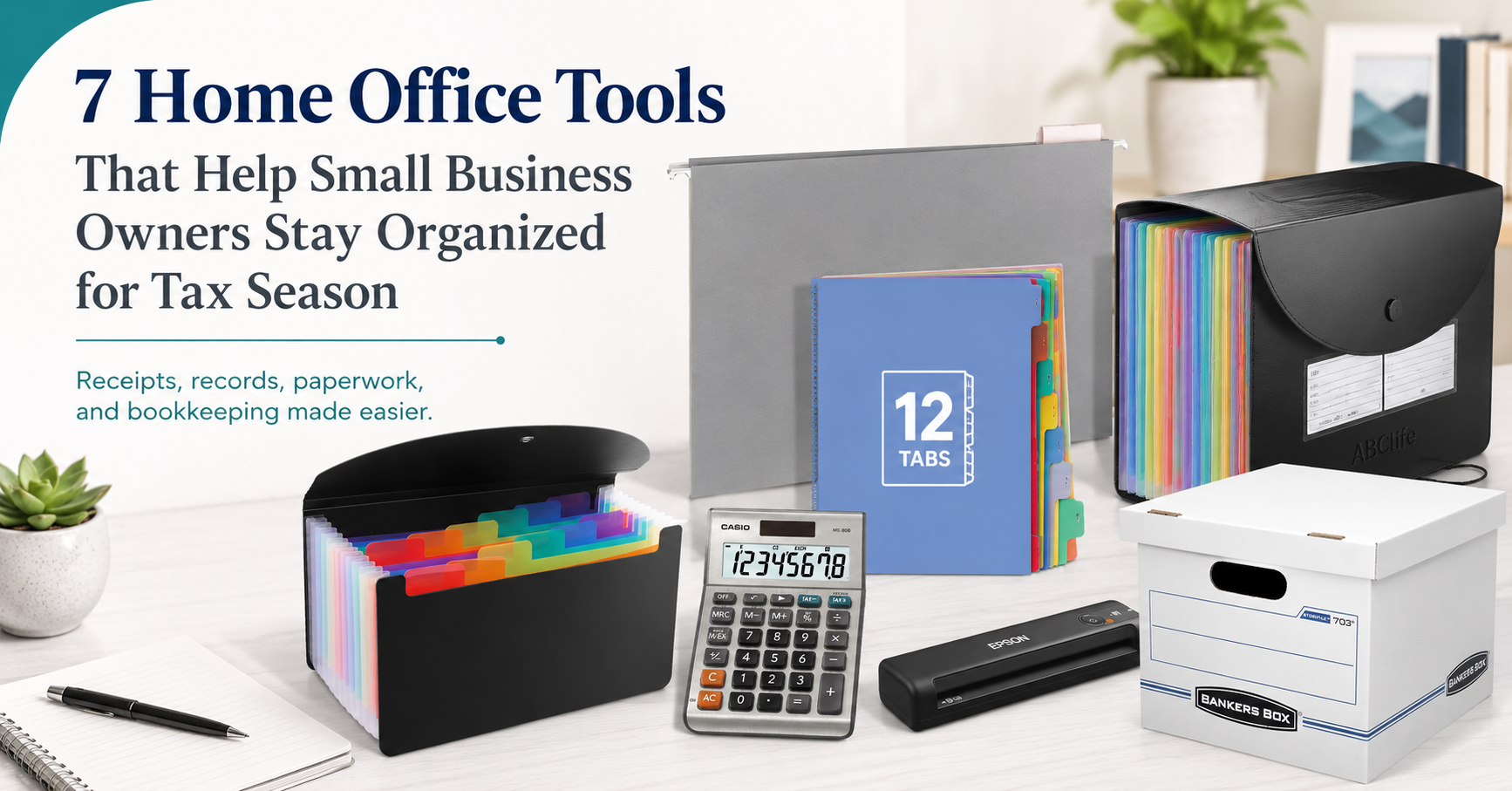
1. ABC life Expanding File Folder, Accordion File Organizer with Colorful A-Z Tabs
The ABC life Expanding File Folder is a practical option for business owners who still deal with paper receipts, statements, invoices, contracts, or tax documents. It is designed as an accordion-style file organizer with colorful A-Z tabs, giving you a simple way to separate documents by category, vendor, client, month, or document type.
For bookkeeping purposes, this type of file organizer can be used to keep business receipts separate from personal paperwork. For example, you could use different sections for fuel receipts, office supplies, bank statements, insurance documents, supplier invoices, and tax forms. The colorful tabs can also make it easier to find a document quickly when you need to support an expense or answer a bookkeeping question.
This organizer is made from polypropylene and has an expandable design. According to the provided product details, it can hold a large volume of A4-size papers and can also be used for receipts, vouchers, coupons, name cards, and other documents. The cover design helps protect important paperwork, while the expandable structure allows it to collapse when not full.
For small business owners, the main value is simple organization. Instead of throwing receipts into a drawer, folder, or shoebox, this type of accordion file can create a clear place for records before they are entered into your bookkeeping system.
2. 12-Tab Binder Dividers with Tabs for 3 Ring Binder
The 12-Tab Binder Dividers can help turn a basic binder into a more organized business record system. These dividers are designed for standard 3-ring binders and letter-size paper, making them useful for monthly bookkeeping files, payroll records, expense categories, bank reconciliations, or tax documents.
Because the dividers include 12 tabs, one simple use is monthly organization. A business owner could create one binder for the year and separate documents by month. January receipts, February bank statements, March supplier invoices, and so on can all be grouped neatly. This makes it easier to review records at month-end instead of trying to sort a full year of paperwork later.
The write-and-erase feature is also useful for changing labels when your filing system evolves. You might start with monthly tabs, then later use the dividers for categories such as payroll, GST/HST, bank statements, credit card statements, inventory, contracts, or vehicle expenses.
For bookkeeping, a binder system works well when paired with regular monthly habits. Print important reports, store key documents, and keep backup paperwork in one place. Even if most of your bookkeeping is digital, a physical binder can still be helpful for documents you want to review quickly.
3. Bankers Box Stor/File Basic-Duty Storage Boxes, 6 Pack
The Bankers Box Stor/File Basic-Duty Storage Boxes are useful for business owners who need longer-term storage for older financial records. Once a bookkeeping year is finished, many documents do not need to stay on your desk, but they should still be stored in an organized and accessible way.
These storage boxes are designed for office use and have a lift-off lid. The provided product details mention basic-duty construction for moderate stacking or shelving. That makes them a practical choice for storing completed year-end files, old invoices, prior-year tax documents, payroll files, and archived business records.
A good habit is to label each box clearly. For example:
“2026 Business Receipts”
“2026 Payroll Records”
“2026 Bank and Credit Card Statements”
“Completed Tax Documents”
This may sound simple, but it can save time later. If your bookkeeper, accountant, or tax preparer asks for a prior-year document, you do not want to search through random piles of paper. A labeled storage box system keeps older records out of your daily workspace while still keeping them available when needed.
For business owners with limited office space, storage boxes can also help separate active files from archived files. Keep current documents within reach and move completed years into labeled boxes.
4. Epson WorkForce ES-50 Portable Sheet-fed Document Scanner
The Epson WorkForce ES-50 Portable Sheet-fed Document Scanner can be helpful for business owners who want to reduce paper clutter and create digital copies of important documents. Scanning receipts, invoices, statements, and ID documents can make bookkeeping more efficient, especially when records need to be shared with a bookkeeper or stored electronically.
According to the provided product details, this is a portable single-sheet-fed document scanner that connects by USB and does not require batteries or an external power supply. It can scan documents, ID cards, and receipts, and it is designed for PC and Mac use. The product details also mention Epson ScanSmart software, which can help users scan, review, and save documents.
For bookkeeping, scanning is useful because paper receipts can fade, get lost, or become damaged. A digital copy gives you an extra layer of organization. You can create folders on your computer or cloud storage by year and month, such as:
2026 > January > Receipts
2026 > February > Supplier Invoices
2026 > March > Bank Statements
A portable scanner can also support remote or mobile work. If you travel, visit clients, or work from different locations, scanning documents as they come in can help prevent paperwork from piling up.
5. Casio MS-80B Standard Function Desktop Calculator
The Casio MS-80B Standard Function Desktop Calculator is a simple but useful tool for everyday office calculations. Even if you use accounting software, spreadsheets, or bookkeeping apps, a desktop calculator can still be handy for quick checks.
The provided product details mention two-way power, tax and currency conversion functions, profit margin percent, plus/minus, key rollover, and a desktop calculator design. For small business owners, this can be useful when reviewing invoices, checking totals, estimating margins, comparing costs, or confirming receipt totals before entering them into a bookkeeping system.
A calculator should not replace proper bookkeeping software, but it can support small day-to-day tasks. For example, you might use it to quickly total a group of receipts, check sales tax amounts, compare supplier invoices, or estimate the cost of office purchases.
The key is not just having a calculator. The real value is using it as part of a more careful review process. Before handing documents to your bookkeeper, you can check totals, attach notes, and make unclear transactions easier to understand.
6. Amazon Basics Sturdy Hanging File Folders, Letter Size, Gray, 25-Pack
The Amazon Basics Sturdy Hanging File Folders can help create a structured filing system inside a file cabinet, desk drawer, or file box. These folders are designed for letter-size documents and include adjustable clear plastic tabs with replaceable paper inserts for custom labels.
Hanging file folders are useful for business owners who want a clean “drop zone” for paperwork. Instead of leaving documents on a desk, you can create labeled folders for common bookkeeping categories, such as:
Receipts to Enter
Invoices to Pay
Bank Statements
Credit Card Statements
Payroll
Tax Documents
Vehicle Expenses
Office Expenses
This type of filing system can support a weekly or monthly bookkeeping routine. For example, all receipts collected during the month can go into one folder. At month-end, the business owner or bookkeeper can review the folder, enter transactions, match receipts, and move completed paperwork to storage.
The folders are also useful for separating business documents from personal documents. That separation matters because mixed records often lead to confusion, missed deductions, duplicate entries, and extra cleanup time.
7. 2 Pack 13 Pockets A6 Mini Coupon Organizer Wallet
The 2 Pack 13 Pockets A6 Mini Coupon Organizer Wallet is a smaller accordion-style organizer that can be useful for receipts, cards, tickets, checks, and smaller documents. Because it is compact, it can work well for business owners who collect receipts while driving, shopping for supplies, meeting clients, or working outside the office.
The provided product details mention 13 pockets, colored labels, polypropylene material, and a flap with elastic button closure. For bookkeeping, a small receipt organizer can help solve a common problem: receipts getting lost before they are recorded.
One practical system is to keep this organizer in your bag, vehicle, or desk drawer. Each pocket can represent a category, such as meals, fuel, parking, office supplies, postage, client purchases, or travel. You can also organize by week or month depending on the number of receipts you collect.
This tool is especially useful for small business owners who are not ready to scan receipts immediately. It creates a temporary holding place until receipts are reviewed, scanned, entered, or sent to a bookkeeper.
Simple Tools Can Support Better Bookkeeping Habits
These products do not replace proper bookkeeping, but they can support the habits that make bookkeeping easier. Organized records help business owners answer questions faster, prepare for tax season with less stress, and give their bookkeeper better information.
The best system is the one you will actually use. Some business owners prefer binders. Others prefer file boxes. Some want to scan everything. Many use a mix of paper and digital records. The goal is not perfection. The goal is consistency.
A simple monthly routine can make a big difference:
Collect receipts in one place.
Separate business and personal documents.
Scan important paperwork.
Label folders clearly.
Store completed records by month or year.
Review documents before tax season arrives.
When records are organized throughout the year, bookkeeping becomes cleaner, financial reports become more useful, and tax preparation becomes less stressful.
Need Help Organizing Your Business Books?
If your receipts, statements, invoices, and records are already messy, you do not have to fix everything alone. Markham Bookkeeping helps small business owners organize their books, clean up past records, track expenses properly, and stay better prepared for tax time.
Whether you are behind on bookkeeping, struggling with receipts, or unsure how to organize your monthly records, professional bookkeeping support can help you build a better system.
Contact Markham Bookkeeping today to get your business records organized and your books moving in the right direction.
FAQ
Do small business owners still need paper files if they use accounting software?
Many businesses use digital accounting software, but paper files can still be useful for original receipts, signed documents, bank paperwork, payroll forms, supplier invoices, and backup records. A simple filing system can support your digital bookkeeping process.
What is the easiest way to organize receipts for tax season?
One simple method is to organize receipts by month and category. You can use an accordion folder, mini receipt organizer, binder, or hanging file folders. The key is to avoid mixing business receipts with personal paperwork.
Should receipts be scanned?
Scanning receipts can be helpful because paper receipts may fade or get lost. Digital copies also make it easier to share documents with your bookkeeper or accountant.
Can office organization really improve bookkeeping?
Yes. Good organization can reduce missing documents, unclear transactions, duplicate entries, and last-minute tax season stress. It also helps your bookkeeper work more efficiently.
What should I do if my business records are already messy?
Start by separating records by year, then by month, then by category. If the cleanup feels overwhelming, Markham Bookkeeping can help organize your records and bring your bookkeeping up to date.


One point that stood out is that tax-season stress often comes from disorganized records rather than complicated accounting. Having a simple system for receipts, invoices, and statements throughout the year can save a lot of time later. I’ve found that setting aside a few minutes each month to review and file documents makes it much easier to stay on top of bookkeeping.