Picture this. It’s period-end. Your bank statements have just landed in your inbox — PDF format, as always. Ten, maybe fifteen pages of transactions staring back at you. And now you need that data in a spreadsheet, clean and ready to work with.
You try copying and pasting. The formatting falls apart. Numbers end up in the wrong columns. Dates go rogue. You spend more time fixing the mess than you would have spent typing it all out manually.
So you look for a smarter way.
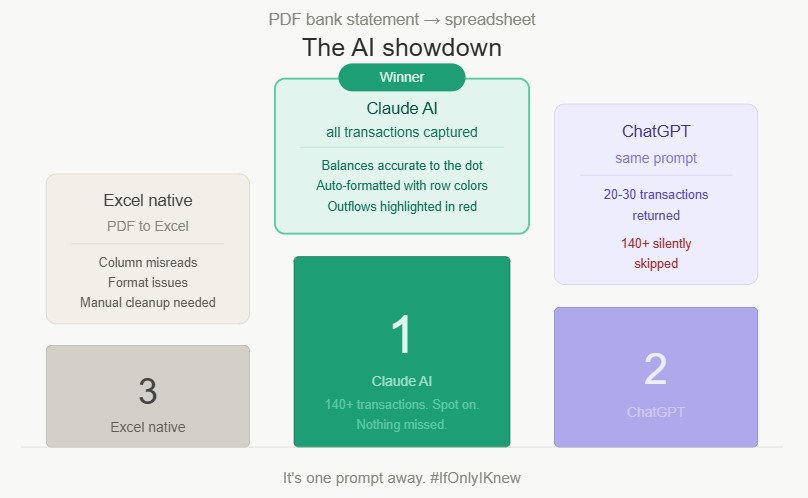
Maybe you try Excel’s built-in PDF-to-Excel conversion. It helps — a little. But columns still misread, formatting breaks in unexpected places, and you’re back to manual cleanup before you can do anything useful with the data.
Maybe you turn to AI. You paste the statement into ChatGPT and ask it to extract the transactions. It returns a neat-looking table — until you count the rows. Twenty, maybe thirty transactions. Your statement had over one hundred and sixty. The rest? Silently skipped. No warning. No flag. Just gone.
That’s the real danger. Not the errors you can see — the ones you can’t.
So what actually works?
I ran the same test with Claude AI. Every single transaction captured. Balances accurate to the dot. Cash outflows automatically highlighted in red, alternating row colors — formatting I didn’t even ask for.
I verified the output in Excel afterwards. Nothing was missed. Not one transaction.
In accounting, a tool that confidently returns incomplete data is worse than no tool at all. You need accuracy on the first attempt — not a result you have to audit before you can trust it.
It’s one prompt away.
How are you currently handling PDF statement imports in your workflow? I’d love to hear what’s working — or not working — for you.