For many Edmonton small business owners, expense categorization seems simple at first. A bank transaction comes in, the accounting software suggests a category, and the business owner or bookkeeper clicks “add.” Over time, hundreds or thousands of transactions get posted into the books.
The problem is that incorrect expense categories can quietly damage the accuracy of your financial reports.
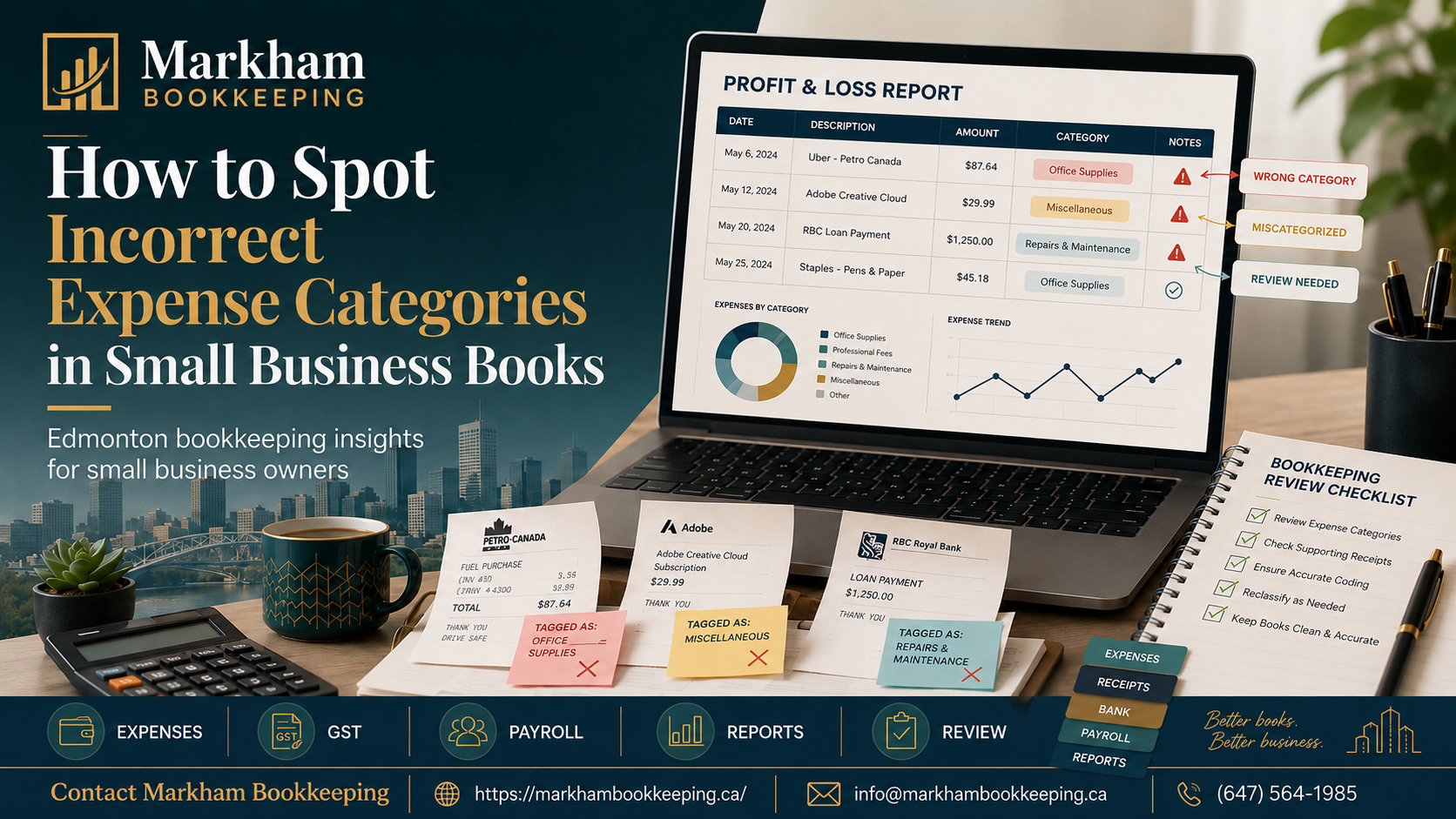
A payment to a vehicle lender might be posted entirely as an auto expense. A shareholder purchase might be coded to office supplies. A software subscription might be buried under miscellaneous expenses. A contractor payment might be recorded as wages. A credit card payment might be treated as an expense instead of a transfer.
These mistakes may not seem serious at first, but they can make your profit and loss statement misleading, affect GST input tax credits, create year-end cleanup work, and make tax preparation harder.
For Edmonton small businesses, clean expense categories matter because your books should help you understand the business, not confuse you. Whether you run a construction business, consulting company, restaurant, retail shop, auto dealership, trade business, or professional service firm, your expense categories should tell a clear story.
Below is a practical guide on how to spot incorrect expense categories in small business books.
Why Expense Categories Matter
Expense categories are the accounts used to organize your business spending. Common examples include rent, utilities, office supplies, meals, advertising, subcontractors, vehicle expenses, insurance, repairs, professional fees, bank charges, software, wages, and interest expense.
When these categories are correct, your financial reports become useful. You can see where money is going, compare expenses month to month, prepare for taxes, review profitability, and make better decisions.
When categories are wrong, your reports can become misleading.
For example, if equipment purchases are posted as office supplies, your expenses may look too high for the month. If loan principal payments are posted as expenses, your profit may look lower than reality. If personal transactions are posted as business expenses, your books may show deductions that should not be claimed.
This is why accountants and bookkeepers review categories carefully during monthly bookkeeping.
1. Look for Large Amounts in Small Expense Categories
One of the easiest ways to spot incorrect expense categories is to scan the profit and loss statement for unusually large amounts.
Some accounts are usually small or moderate, such as office supplies, postage, meals, subscriptions, bank charges, and small tools. If one of these categories suddenly has a large amount, it may need review.
For example, if “Office Supplies” shows $8,500 in one month, ask what caused it. It could be legitimate, but it might also be a laptop, furniture, equipment, leasehold improvement, or asset purchase posted to the wrong account.
Edmonton small business owners should review large monthly expenses and ask:
- Does this category make sense for the size of the transaction?
- Was this a normal operating expense or a capital purchase?
- Is the receipt or invoice attached?
- Should part of the payment go to GST, loan principal, or another balance sheet account?
- Is this a business expense or a personal purchase?
Large amounts in unusual categories are often the first sign that bookkeeping cleanup is needed.
2. Review the Miscellaneous Expense Account
The miscellaneous expense account can become a hiding place for unclear transactions. When a bookkeeper, business owner, or software rule is unsure where something belongs, it may get posted to miscellaneous.
A small amount in miscellaneous may not be a big issue. But if the balance grows every month, that is a warning sign.
In clean bookkeeping, most expenses should have a clear purpose. Advertising should go to advertising. Insurance should go to insurance. Accounting fees should go to professional fees. Software should go to software or subscriptions. Repairs should go to repairs and maintenance.
If your Edmonton business has a large miscellaneous expense balance, review the details. You may find payments that should be moved to better categories.
Examples include:
- Google Ads or Meta Ads posted to miscellaneous instead of advertising
- QuickBooks or payroll software posted to miscellaneous instead of software
- CRA payments posted to miscellaneous instead of tax payable or payroll liabilities
- Vehicle repairs posted to miscellaneous instead of auto repairs
- Supplier refunds posted incorrectly as expenses
A good rule is simple: if the transaction can be described clearly, it probably should not stay in miscellaneous.
3. Check for Personal Expenses Mixed into Business Expenses
Personal spending is one of the most common reasons business books become messy. This is especially common in small owner-managed businesses where the business bank account or credit card is used for both business and personal purchases.
Personal expenses should usually not be mixed into regular business expense categories. In a corporation, they may need to be coded to shareholder loan. In a sole proprietorship, they may need to be treated as owner draws or excluded from business expenses.
Common personal transactions that get miscategorized include:
- Groceries
- Family meals
- Personal fuel
- Clothing not used for work
- Personal travel
- Home purchases
- Entertainment
- Personal subscriptions
- Personal loan payments
For Edmonton small business owners, this matters because personal expenses posted as business deductions can distort profit and create tax issues.
To spot this problem, review categories like meals, travel, vehicle expenses, supplies, and miscellaneous. Look for vendor names that do not seem related to the business. If the expense does not have a business purpose, it should be reviewed before year-end.
4. Watch for Credit Card Payments Recorded as Expenses
This is a very common bookkeeping mistake.
When a business pays a credit card from its bank account, that payment is not an expense by itself. The actual expenses were already recorded when the credit card transactions were entered. The payment from the bank to the credit card should usually be recorded as a transfer or credit card payment.
If the payment is recorded as an expense, your books may double-count expenses.
For example:
Your business credit card has $2,000 of purchases, including fuel, meals, software, and supplies. These transactions are recorded properly in the credit card account. Then your bank account shows a $2,000 payment to the credit card. If that payment is also posted as “credit card expense,” your expenses may be overstated.
To spot this issue, look for categories such as:
- Credit card payment
- Visa payment
- Mastercard payment
- Loan payment
- Bank transfer
- Uncategorized expense
If you see large payments to credit cards sitting in expense accounts, they may need to be reclassified.
5. Separate Loan Principal and Interest
Loan payments are another area where expense categorization often goes wrong.
A loan payment usually includes principal and interest. The principal portion reduces the loan balance on the balance sheet. The interest portion is recorded as an expense.
If the full loan payment is posted to an expense account, your profit and loss statement may show too much expense, and your loan balance may remain incorrect.
This can happen with:
- Vehicle loans
- Equipment financing
- Business loans
- Lines of credit
- Mortgage payments
- Financing agreements
For example, if your Edmonton business pays $1,200 per month for a vehicle loan, the full $1,200 should not automatically go to vehicle expense. Part of it may be loan principal, and part may be interest.
To spot this issue, compare the loan balance in your books with the lender statement. If the loan balance is not going down, or if the full payment is showing as an expense every month, the category may be wrong.
6. Check Meals, Entertainment, and Travel Carefully
Meals and travel expenses often need extra review because they can include both business and personal activity.
A meal with a client may be business-related. A personal restaurant visit may not be. A hotel stay for a business trip may be valid. A family vacation may not be. A coffee meeting with a supplier may be business-related. Random coffee purchases may need more support.
For Edmonton business owners, meals and travel should be reviewed with proper notes and receipts. The books should show enough detail to support why the expense was business-related.
Look for:
- Missing receipts
- Personal restaurant charges
- Travel with no business purpose
- Meals posted without explanation
- Large entertainment charges
- Mixed personal and business trips
This does not mean every meal is wrong. It means the category should be reviewed carefully so the records are clean and supportable.
7. Review Vehicle Expenses for Consistency
Vehicle expenses are common for contractors, trades businesses, consultants, real estate professionals, delivery businesses, and service companies in Edmonton.
Common vehicle expense categories include fuel, repairs, insurance, registration, parking, tolls, lease payments, and vehicle loan interest.
Incorrect categorization can happen when:
- Personal vehicle expenses are posted as business expenses
- Vehicle loan principal is posted as repairs or fuel
- Insurance is posted to general insurance instead of vehicle insurance
- Repairs are posted to supplies
- Fuel is posted to meals or travel
- Vehicle purchases are expensed instead of recorded as assets
If your business uses vehicles, review the vehicle expense accounts monthly. Compare the expenses to how the vehicle is used in the business. If there are several vehicles, consider tracking by vehicle or class if the accounting system allows it.
8. Identify Vendor Names That Do Not Match the Category
Vendor review is one of the fastest ways to catch incorrect categories.
For example, if the vendor is an insurance company but the transaction is posted to office supplies, the category may be wrong. If the vendor is a payroll provider but the transaction is posted to subcontractors, it may need review. If the vendor is a lender but the transaction is posted to repairs, it likely needs reclassification.
Run a transaction detail report by expense category and scan the vendor names.
Common mismatches include:
- Insurance companies posted to office supplies
- Software companies posted to bank charges
- Fuel stations posted to meals
- Contractors posted to wages
- CRA payments posted to taxes and licenses instead of payroll or GST payable
- Equipment vendors posted to supplies
- Loan companies posted to auto expenses
This review is simple but powerful. Vendor names often reveal whether the category makes sense.
9. Compare Expenses Month to Month
Monthly comparison is another effective way to spot incorrect categories.
If your rent is usually $3,000 per month and suddenly shows $6,000, there may be a duplicate entry. If advertising is usually $500 and suddenly shows zero, a payment may have been categorized somewhere else. If software subscriptions suddenly increase, a large purchase may have been posted incorrectly.
For Edmonton small businesses, month-to-month review helps catch mistakes before they pile up.
Look for:
- Sudden spikes
- Sudden drops
- Duplicate charges
- Missing recurring expenses
- Unusual vendor activity
- New categories with large balances
- Old categories no longer being used
This review is especially useful during monthly bookkeeping because errors are easier to fix while the transactions are still fresh.
10. Check Uncategorized Transactions Every Month
Uncategorized income and uncategorized expense should not sit in the books for long. These accounts usually mean transactions were added from the bank feed but not properly classified.
If your profit and loss statement has uncategorized expense, your reports are not complete.
Common reasons transactions stay uncategorized include:
- Missing receipts
- Unknown vendor names
- No description from the business owner
- Bank feed rules not set up
- Bookkeeper waiting for clarification
- Personal and business spending mixed together
A clean monthly bookkeeping review should clear these accounts or at least identify what information is missing.
11. Watch for Duplicate Expenses
Duplicate expenses can happen when bank feeds, manual entries, bills, and receipts are not matched properly.
For example, a vendor bill may be entered manually, and then the bank feed transaction may also be added as an expense. This creates two expenses for one purchase.
Duplicates are common with:
- Supplier bills
- Credit card transactions
- Receipt uploads
- Loan payments
- E-transfer payments
- Payroll entries
- Vendor payments
To spot duplicates, look for same vendor, same amount, same date, or similar descriptions. Accounting software may catch some duplicates, but not all of them.
12. Review Asset Purchases
Not every purchase should be treated as an immediate expense. Larger purchases may need to be recorded as assets and depreciated over time.
Examples include:
- Computers
- Equipment
- Vehicles
- Furniture
- Machinery
- Leasehold improvements
- Major tools
- Large appliances
- POS systems
If these are posted to office supplies, repairs, or miscellaneous expenses, your monthly profit may look lower than it really is.
For Edmonton businesses investing in equipment, tools, vehicles, or renovations, asset classification is important. Review large purchases and decide whether they belong on the balance sheet instead of the profit and loss statement.
13. Check GST Coding on Expenses
Expense categories are important, but GST coding is also important. A transaction may be posted to the right expense category but still have the wrong GST treatment.
For example, GST may be claimed where it should not be, or GST may be missed on eligible business expenses.
During an expense review, look for:
- Expenses with no GST where GST may apply
- GST claimed on personal expenses
- GST claimed on non-eligible purchases
- GST missed on supplier invoices
- Imported or online purchases with different tax treatment
- Vendor invoices that do not support the GST claim
Incorrect GST coding can affect your GST return and your GST payable balance.
14. Use a Clean Chart of Accounts
Sometimes expense category problems happen because the chart of accounts is too messy.
If there are too many similar accounts, transactions may be posted inconsistently. For example, you may have office expense, office supplies, supplies, general supplies, and admin expenses all being used for similar purchases.
On the other hand, if there are too few accounts, everything may be posted to broad categories like general expense or miscellaneous.
A good chart of accounts should be simple but useful. It should match the business type and reporting needs.
For example, a contractor in Edmonton may need categories for subcontractors, materials, tools, equipment rental, permits, fuel, and vehicle repairs. A consultant may need software, professional fees, advertising, office expenses, and travel. A restaurant may need food costs, delivery fees, merchant fees, wages, rent, utilities, and supplies.
The right categories depend on the business.
Final Thoughts
Incorrect expense categories can make small business books look cleaner than they really are. The bank may reconcile, the reports may generate, and the software may look organized, but the numbers can still be wrong if transactions are posted to the wrong accounts.
For Edmonton small business owners, spotting incorrect expense categories is an important part of monthly bookkeeping. Review large amounts, miscellaneous expenses, personal transactions, credit card payments, loan payments, vendor names, GST coding, and month-to-month changes.
Clean expense categories help you understand your true profit, prepare better tax filings, manage cash flow, and avoid stressful year-end cleanup.
Monthly review is where bookkeeping becomes useful. It is not just about recording transactions. It is about making sure the numbers actually make sense.
Need help cleaning up expense categories in your Edmonton small business books? Markham Bookkeeping helps business owners with bookkeeping cleanup, expense review, GST, payroll, reconciliations, and monthly financial reporting.
Website: https://markhambookkeeping.ca/