For many home-based business owners, the printer is still one of the most useful office tools. Even with cloud accounting, online banking, digital receipts, and paperless bookkeeping apps, there are still times when a business owner needs to print, scan, copy, file, or sign documents.
This is especially true for accountants, payroll experts, bookkeepers, finance professionals, consultants, freelancers, and small business owners who deal with invoices, receipts, payroll reports, contracts, tax documents, bank statements, supplier paperwork, and client files.
A good printer is not just about printing pages. It can support better organization, cleaner records, faster admin work, and smoother bookkeeping habits.
Affiliate Disclosure: This article contains affiliate links. If you purchase through these links, Markham Bookkeeping may earn a commission at no extra cost to you. The products below are included for educational and business-organization purposes only.
Why Home-Based Business Owners Still Need a Printer
Many small business owners try to keep everything digital, but paperwork still shows up. You may need to print a contract, scan a signed form, copy a government letter, organize payroll documents, or keep a paper backup of important tax records.
For a bookkeeper or accountant, a printer can help when reviewing year-end files, preparing working papers, organizing CRA-related documents, or scanning receipts from clients. For payroll experts, it can help with employee forms, payroll summaries, ROE-related documents, and internal admin files. For finance professionals, it can support reporting, client presentations, and document review.
The right printer depends on your workflow. Some businesses need fast black-and-white printing. Others need colour printing for client-facing materials. Some need a compact printer for small spaces, while others need a portable option for travel or mobile work.
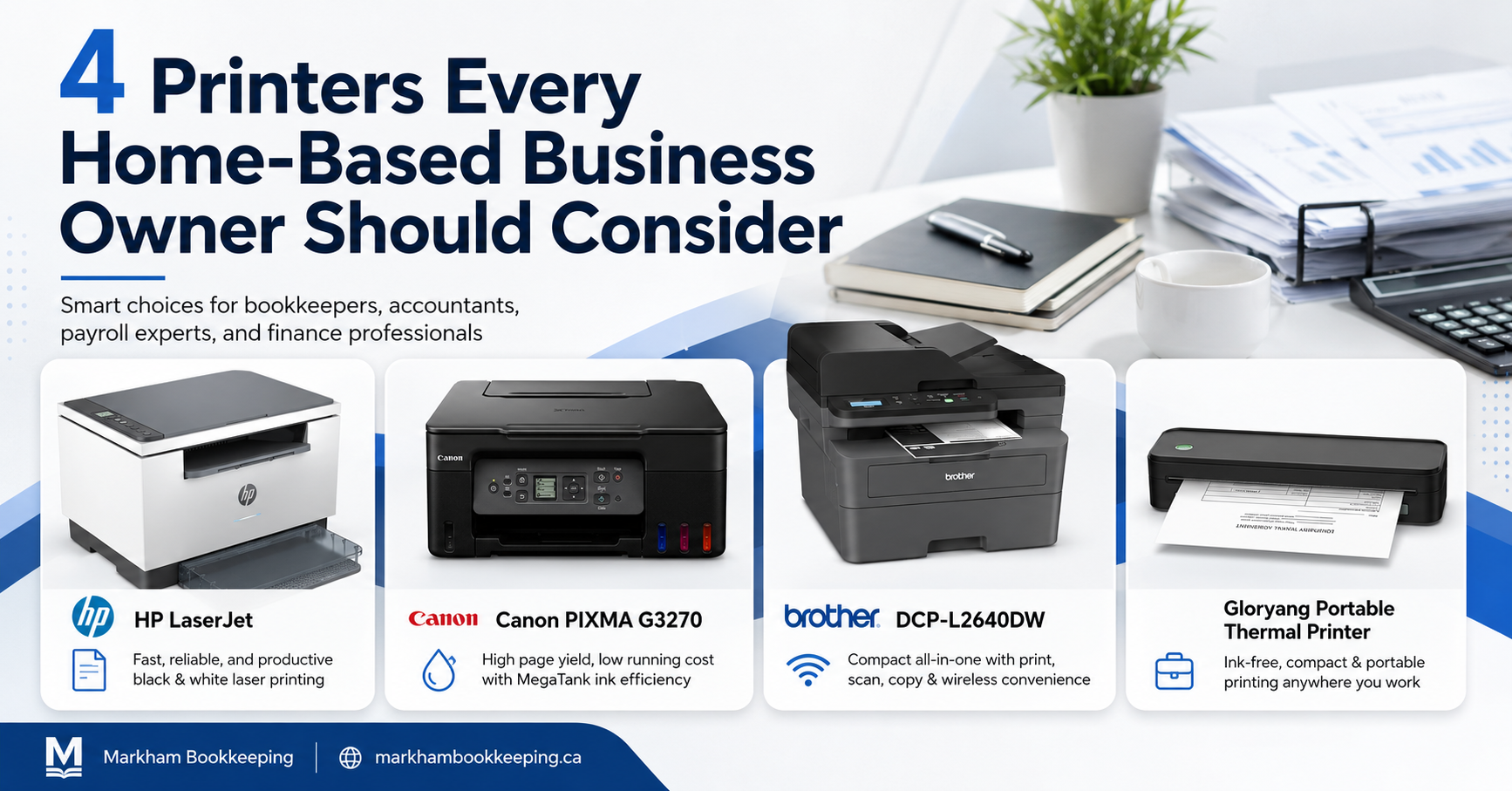
Here are four printers every home-based business owner should consider.
1. Brother DCP-L2640DW Business Monochrome Multifunction Laser Printer
Product: Brother DCP-L2640DW Business Monochrome Multifunction Laser Printer with 700 Prints in-Box
The Brother DCP-L2640DW is a practical option for home-based business owners who mostly print black-and-white business documents. If your office work involves invoices, statements, reports, client forms, tax documents, bookkeeping schedules, or payroll summaries, a monochrome laser printer can be a reliable choice.
This printer is described as compact, durable, and affordable. It produces sharp black-and-white prints and also supports scanning, which can be useful for digitizing receipts, signed documents, supplier invoices, and client paperwork.
For bookkeepers and accountants, the scanning function can be especially helpful. Many bookkeeping problems start when receipts and invoices are not saved properly. A printer-scanner combination gives business owners a simple way to convert paper records into digital files before they get lost.
The Brother DCP-L2640DW also offers different connection options, including Ethernet, USB, and dual-band wireless connectivity. That matters for home offices where multiple devices may need access to the same printer. A business owner, assistant, bookkeeper, or payroll expert may all need to print from different devices.
Another useful feature is the 250-sheet paper tray and 50-page auto document feeder. If you regularly scan or copy multi-page documents, this can save time compared to placing pages one by one.
Useful for:
Home-based bookkeepers, accountants, payroll professionals, consultants, and business owners who need reliable black-and-white printing and scanning.
Key features provided:
Brother brand, Ethernet and USB connectivity, laser printing, auto-duplex, Energy Star, monochrome output, up to 36 ppm black-and-white printing, 250-sheet paper tray, 50-page auto document feeder, and Brother Mobile Connect support.
2. Canon PIXMA G3270 MegaTank Wireless Printer
The Canon PIXMA G3270 is a colour all-in-one printer, scanner, and copier. This makes it a good option for home-based business owners who need more than basic black-and-white printing.
For example, some business owners may print branded documents, colour reports, client handouts, charts, simple marketing materials, or visual summaries. Accountants and finance professionals may sometimes need colour for graphs, schedules, or presentation documents. A colour printer can also be useful when printing copies of forms, receipts, and supporting documents where colour makes the information easier to read.
The Canon PIXMA G3270 uses integrated ink tanks and is described as capable of printing up to 6,000 black pages and 7,700 colour pages with a single set of inks. Since printing costs can matter for small businesses, an ink tank printer may be worth considering when colour printing is part of the workflow.
It also supports wireless printing and mobile printing through the Canon PRINT app, Apple AirPrint, and Mopria Print Service. This can help home-based professionals print from phones, tablets, or laptops without needing a complicated setup.
For bookkeeping organization, the scanning and copying functions are important. If receipts, invoices, contracts, and government letters arrive in paper form, scanning them quickly helps keep business records organized. A business owner can then upload those documents into bookkeeping software, cloud storage, or a shared folder for their bookkeeper.
Useful for:
Home-based business owners, consultants, self-employed professionals, and finance professionals who want colour printing plus scanning and copying.
Key features provided:
Canon brand, USB and Wi-Fi connectivity, inkjet printing, refillable ink tank, borderless printing, Energy Star, colour output, 100-sheet plain paper capacity, mobile printing, and integrated ink tanks.
3. HP LaserJet MFP M234dw Printer
Product: HP LaserJet MFP M234dw Printer | 6GW99F
The HP LaserJet MFP M234dw is another monochrome laser printer option for home offices that need fast and professional black-and-white printing. It includes printing, copying, and scanning functions, which makes it useful for small business administration and financial paperwork.
This printer may appeal to business owners who want a network-ready laser printer with auto-duplex printing. Duplex printing is useful because it allows double-sided printing, which can help reduce paper use when printing reports, statements, payroll summaries, or internal documents.
The printer has a listed maximum monochrome print speed of 30 ppm and a monthly duty cycle of up to 20,000 pages. That makes it worth considering for home-based businesses that print frequently, such as bookkeepers, accountants, payroll experts, consultants, or professionals managing client files.
It also includes several connectivity options, including Hi-Speed USB 2.0, Ethernet, wireless, and Bluetooth low energy. For a home office with multiple devices, this flexibility can be helpful.
From a bookkeeping point of view, a printer like this supports better document control. Instead of letting papers pile up, a business owner can print, scan, copy, and file documents in a more consistent way. For example, payroll records, supplier invoices, tax notices, and signed agreements can be scanned and saved before they become part of a messy paper stack.
Useful for:
Business owners and finance professionals who need monochrome laser printing, scanning, copying, duplex printing, and network-ready connectivity.
Key features provided:
HP brand, laser printing, monochrome output, auto-duplex, cloud print enabled, Energy Star, HP Auto On/Off Technology, network-ready, up to 30 ppm black-and-white printing, copy resolution up to 600 x 600 dpi, and input tray capacity up to 150 sheets.
4. Gloryang Inkless Portable Thermal Printer
The Gloryang Inkless Portable Printer is different from the other printers on this list because it is designed for portability. It uses thermal printing technology, which means it does not require ink, toner, or ribbons. According to the product details provided, it is only compatible with Gloryang thermal paper.
This type of printer may be useful for business owners who travel, work from different locations, visit clients, or need a compact printer that fits in a backpack or briefcase. It weighs 1.75 lb and is described as 1.7 inches thick, making it a space-saving option for mobile work.
For accountants, payroll experts, mobile bookkeepers, and finance professionals who sometimes work outside a traditional office, a portable printer can be convenient. It may help with printing contracts, office documents, emergency paperwork, simple reports, or client forms while away from the main workspace.
The printer connects by Bluetooth to iOS and Android devices and can also connect to computers using USB. It includes a carrying case, charging cable, and three rolls of thermal paper. The built-in battery is described as offering up to 3 hours of continuous printing and up to 360 sheets on a single charge.
This is not the same kind of printer as a full home-office laser or inkjet machine. It is better understood as a portable document printer for specific situations where space, mobility, and inkless printing matter.
Useful for:
Mobile professionals, travelling consultants, field workers, students, bookkeepers visiting clients, and business owners who need compact printing away from the office.
Key features provided:
Gloryang brand, Bluetooth connectivity, thermal printing, portable design, monochrome output, inkless printing, carrying case, 3 rolls of thermal paper, built-in battery, and compact travel-friendly size.
How to Choose the Right Printer for Your Home Business
Before buying a printer, think about how your business actually handles paperwork.
If you mainly print invoices, payroll reports, bank statements, bookkeeping schedules, and black-and-white documents, a monochrome laser printer like the Brother DCP-L2640DW or HP LaserJet MFP M234dw may be practical.
If you need colour documents, photos, branded pages, visual reports, or marketing materials, the Canon PIXMA G3270 may be a better fit.
If you travel often or work from different locations, the Gloryang portable thermal printer may be worth considering for mobile printing needs.
For bookkeepers, accountants, payroll experts, and finance professionals, the biggest question is not just “Can this printer print?” The better question is: “Will this printer help keep documents organized, easy to scan, and easier to share with the right person?”
Good recordkeeping starts with simple habits. A reliable printer-scanner can help you create those habits.
Final Thoughts
A printer may not seem exciting, but it can play an important role in business organization. For home-based business owners, the right printer can support cleaner records, faster admin work, better tax preparation, and smoother communication with your accountant or bookkeeper.
Whether you need a compact monochrome laser printer, a colour ink tank printer, a network-ready office printer, or a portable thermal printer, the best choice depends on your daily workflow.
If your business paperwork is messy, your receipts are scattered, or your bookkeeping records are hard to follow, the problem may not only be your tools. You may also need a better bookkeeping system.
Need Help Organizing Your Business Records?
Markham Bookkeeping helps Canadian small business owners, self-employed professionals, and home-based businesses stay organized with bookkeeping, payroll, tax records, and financial reporting.
If your receipts, invoices, payroll documents, or monthly records are falling behind, contact Markham Bookkeeping today and get your books back under control.
FAQ
Do home-based business owners still need a printer?
Yes. Even with digital tools, many businesses still need to print, scan, copy, or save paper documents such as receipts, invoices, payroll records, contracts, tax letters, and client forms.
What type of printer is best for bookkeeping documents?
For regular black-and-white bookkeeping documents, a monochrome laser printer can be practical. For colour reports, branded documents, or visual materials, a colour inkjet or ink tank printer may be useful.
Should bookkeepers and accountants use a scanner?
Yes. Scanning helps turn paper receipts, invoices, and supporting documents into digital records. This can make bookkeeping cleaner and reduce the chance of losing important paperwork.
Is a portable printer useful for business owners?
A portable printer can be useful for business owners, consultants, mobile bookkeepers, and finance professionals who travel or work from different locations.
Can a printer help with tax organization?
Yes. A printer with scanning and copying features can help organize receipts, invoices, payroll documents, bank statements, and tax-related paperwork before tax season.